Sub-Bid Leveling Software for General Contractors
Collect subcontractor bids, level them against your AI estimate, and assemble the customer bid
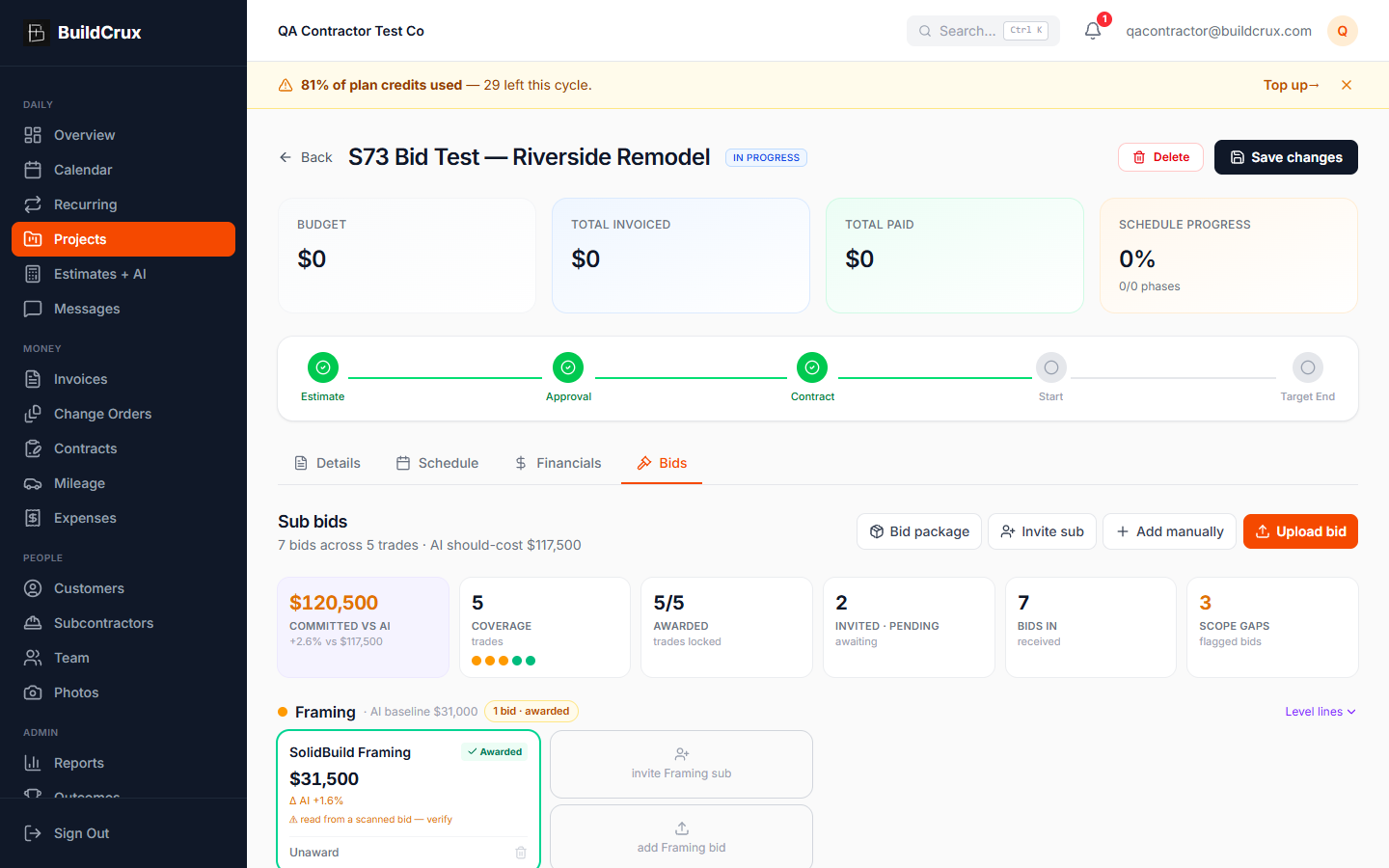
Stop leveling sub bids on a legal pad. BuildCrux gives every project a Bids tab where you collect subcontractor bids three ways: upload the PDFs yourself, send a per-trade invite link the sub opens and uploads to with no login, or key in a bid total by hand. Each uploaded bid is read by AI into line items, a bid total, and the inclusions, exclusions, and assumptions that actually decide a comparison, so you are leveling apples to apples instead of eyeballing a stack of mismatched PDFs. The board groups bids by trade, normalizes a bid that excludes scope by holding that work at your AI should-cost, and shows each bid's variance against the AI estimate, so the cheapest raw number is not mistaken for the best value. Coverage dots tell you at a glance which trades have real competition and which still need a chase, and any trade with no bid stays held on your AI estimate so the committed number is never quietly short. When you award, the awarded bids plus the held scope roll into a new draft customer estimate with your GC markup, ready to review and send through your normal flow.
What you get
Sub-Bid Leveling — frequently asked questions
How do subcontractors get their bids to me — do they need an account?
You can collect a bid three ways: upload the sub's PDF yourself, key in a bid total by hand, or mint a per-trade invite link the sub opens and uploads to with no account and no login. That last option means your subs don't have to sign up for anything to send you a bid.
How does it compare bids that don't cover the same scope?
AI reads each uploaded bid into line items, a total, and the inclusions, exclusions, and assumptions, copying the printed figures rather than inventing them. When a bid leaves scope out, BuildCrux normalizes it by holding the missing work at your AI estimate's should-cost, so best value is the lowest normalized total instead of the lowest sticker price. Open Level lines to see every AI scope line beside each bid with a GAP marker wherever a bid is missing that scope.
What happens to trades that haven't sent a bid yet?
Coverage dots per trade show red for zero bids to chase, amber for one bid with no leverage, and green for two or more real comparisons. Any trade with no bid stays held on your AI estimate, so the committed total for the job is never silently short the unbid work.
Does it pick the winning sub for me?
No. You decide every award; it's never auto-assigned to the lowest number, and your AI estimate stays the should-cost anchor while you make the call. When you award, the awarded bids plus the AI-held scope for excluded and unbid trades roll into a new draft customer estimate with your GC markup, ready to review and send through your normal flow.
Ready to streamline your business?
Try BuildCrux risk-free with our 30-day money-back guarantee — full refund within 30 days.